Monday, November 7, 2011
iphone problem
នេះជារបៀបដោះស្រាយបញ្ហាខាងលើ៖
/private/var/mobile/media/itunes_control/itunes
then delete iTunesDB or iTuneCDB
open iTune again will recognize
/private/var/mobile/media/itunes_control/itunes
then delete iTunesDB or iTuneCDB
open iTune again will recognize
លុបលេខដែលបានហៅចេញចូល ម្តងមួយ
ចូលទៅ Cydia
add source sinfuliphonerepo.com
find and install Recent/CallLog Delete...
add source sinfuliphonerepo.com
find and install Recent/CallLog Delete...
3 - now you can use your Recent/CallLog Delete
BatterySence Will Help You Get The Most Of Your iOS Device Battery
We have been reporting about users complaining about the battery drain issue in the iOs 5 and the iPhone 4S, And while Apple engineers are working on a solution to the problem. Philips has released an app that will help you get the most of your iOS device battery.
Download BatterySence for iPhone, iPad, iPod touch for free.
Philips created this simple and intuitive app to help you get the most out of your device when you’re in between charges. By telling it what you need to do and for how long, BatterySense can recommend what settings to adjust to achieve more battery life while on the go.BatterySense is a free app that shows you what iPhone, iPod Touch and iPad functions you can use and for how long based on your device’s current battery charge. It also suggests ways to preserve battery life based on how long you need your battery to last.
BatterySence Main Screen:
The main screen prominently displays your current battery charge. Tapping a button shows you estimated time remaining for the most common activities including:
- Talk time (for iPhone)
- Internet calling (for iPod Touch)
- eBook reading (for iPad)
- Internet use
- Audio Playback
- Video playback
- Standby time
- Game play
- Time until fully charged
Want to see everything at a glance? The “All data” view provides a detailed look at each activity and estimates for how much time is remaining for each.
“WHAT IF?” RECOMMENDATIONS
The “What if” feature provides a fun and interactive way to see estimates for how much battery life you could achieve if you changed specific settings on your iPhone, iPad or iPod Touch.Use the “What if” slider by dragging your finger to the battery level you would like to achieve, and let BatterySense make the best recommendations for how to achieve it.
The BatterySense app provides battery charge and remaining battery life estimates – some variances may occur depending on a combination of factors, including your battery’s age. BatterySense makes suggestions to preserve your battery life but doesn’t actually turn any settings on or off. You can follow BatterySense suggestions by simply browsing to your device’s Settings.
Download BatterySence for iPhone, iPad, iPod touch for free.
Saturday, November 5, 2011
How to delete facebook account
Facebook the large social network, contains more than 750 million users having fun with their friends and more. Now Facebook is changing lots of features like Chat, Messages, Advertisements and more. Few people are not satisfied with new features like Chat and more.
Also Read: How to Get old Facebook chat back
More People are not aware of deleting the Facebook account permanently, Today let me show you how to deactivate and Delete Facebook account permanently. There is two difference between deactivating the account and Deleting the account. Deactivating is just you will disable your account and others cant see your profile or information but you can reactivate your account by login Facebook again. but Deleting the Account is permanently you will delete your profile and information from Facebook.How To Deactivate Facebook Account
If you want to Deactivate your Facebook account, You should follow these steps.
Step 1:
First go to Account and click Account settings.
In your Account Settings, select Security tab and now you can see Deactivate your account click on it.
After clicking Deactivate your account, you will get Deactivate page of Facebook. Fill the Following details and click CONFIRM.
Now your Facebook account is Deactivated. Your profile will be not shown in any of your friends or any people. You are reactivate the account by simply login your Facebook account.
How to Delete Facebook Account Permanently
To Delete Facebook account permanently, First you should Delete everything which is related to your profile (example: Pictures, friends, Messages, Wall-Posts, news Feeds, mini-feeds, posted items, interests, groups, fan pages, applications, etc.) but before deleting Download the All information from your Facebook account.
Then You should go to
and click “Submit”
After few days you have no option to reactivate your account and your account will be deleted permanently.
Any doubt, Watch out our Video tutorial
f you like this post, Share it to your friends. Dont forget toFacebook.
Friday, November 4, 2011
វចនានុក្រមខ្មែរថ្មី Phum Dictionary សម្រាប់ Android
This is our first Khmer Dictionary for Android OS. It is free and always be.
Features:
- Completely free for all Khmer Users
- Fast and smart searching
- Comprehensive Definitions
- All in one: English-Khmer and Khmer English (will be available in version 2.0)
Screenshots:
Free Download:
- Get it from Android Market
ប្រភព KhmerAdroid
Wednesday, November 2, 2011
ដំណោះស្រាយពេលភ្លេចពាក្យសម្ងាត់ ចូល Window
ប្រសិនបើនៅក្នុងកុំព្យូទ័រលោកអ្នកមាន User Account ហើយលោកអ្នកបានដាក់ពាក្យសម្ងាត់ (Password)ទៅឱ្យវា ហើយភ្លេច។ តើលោកអ្នកធ្វើដូចម្តេចទើបចូលទៅប្រើប្រាស់កុំព្យូទ័របាន? សូមកុំបារម្មណ៍ ខេធី៤២ នឹងណែនាំនៅកម្មវិធីមួយមានឈ្មោះថាRED Cammander 2005 ។
ERD Commander 2005គឺជាកម្មវិធីមួយប្រើសម្រាប់បង្កើតឌីស Windows មួយដែល ដំណើរការដោយមិនចាំបាច់មានប្រព័ន្ធប្រតិបត្តិការ (Live CD)ជាពិសេសឌីសនោះមានសមត្ថភាពអាច លុបលេខសម្ងាត់ដែលយើងភ្លេច ហើយដាក់លេខសម្ងាត់ថ្មីជំនួសវិញ (Change Password) …។ សូមមើលនូវអនុវត្តដូចខាងក្រោមៈ
ជាដំបូងសូមដាក់ស៊ីឌីកម្មវិធី ERD Commander2005 ដែលយើងបានបង្កើតរួចរាល់ហើយ ចូលទៅក្នុង CD-Room ហើយចូលទៅកាន់ BIOS ដើម្បីកែ ឱ្យ Boot ចេញពី CD-Room
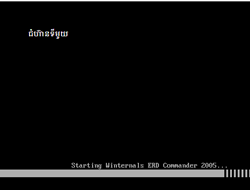
ពេលនោះវានឹងដំណើរការកម្មវិធីដូចខាងក្រោមៈ
ERD Commander 2005គឺជាកម្មវិធីមួយប្រើសម្រាប់បង្កើតឌីស Windows មួយដែល ដំណើរការដោយមិនចាំបាច់មានប្រព័ន្ធប្រតិបត្តិការ (Live CD)ជាពិសេសឌីសនោះមានសមត្ថភាពអាច លុបលេខសម្ងាត់ដែលយើងភ្លេច ហើយដាក់លេខសម្ងាត់ថ្មីជំនួសវិញ (Change Password) …។ សូមមើលនូវអនុវត្តដូចខាងក្រោមៈ
ជាដំបូងសូមដាក់ស៊ីឌីកម្មវិធី ERD Commander2005 ដែលយើងបានបង្កើតរួចរាល់ហើយ ចូលទៅក្នុង CD-Room ហើយចូលទៅកាន់ BIOS ដើម្បីកែ ឱ្យ Boot ចេញពី CD-Room
ពេលនោះវានឹងដំណើរការកម្មវិធីដូចខាងក្រោមៈ
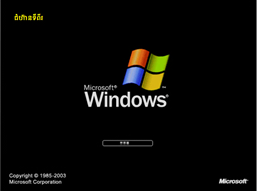
សូមរង់ចាំមួយរយៈ រួចចុចលើប៊ូតុង Skip Network Conficuration សូមចុចលើប៊ូតុង OK
បន្ទាប់មកសូម Select លើពាក្យ C:\WINDOWS Microsoft Windows XP Professional, Service Pack2
បន្ទាប់មកយើងនឹងបានផ្ទាំងដូចខាងក្រោមៈ

បន្ទាប់មកសូមចុច Next យើងនឹងបានរូបដូចខាងក្រោមបន្តទៀត

- Account = សូមជ្រើសរើសឈ្មោះអ្នកប្រើប្រាស់ (User) ដែលយើងចង់ប្តូរ ឬដោះលេខសម្ងាត់
បន្ទាប់មកសូមចុច Next យើងនឹងបានរូបដូចខាងក្រោមបន្តទៀត
- Account = សូមជ្រើសរើសឈ្មោះអ្នកប្រើប្រាស់ (User) ដែលយើងចង់ប្តូរ ឬដោះលេខសម្ងាត់
- New Password = បន្ទាប់មកវាយលេខសម្ងាត់ថ្មី
- Confirm Password = វាយលេខសម្ងាត់ដូចខាងលើម្តងទៀត
បញ្ជាក់ៈ ពេលយើងដាក់លេខសម្ងាត់ថ្មី ពេលនោះវាលុបលេខសម្ងាត់ចាស់ចោលដោយស្វ័យប្រវត្តិ
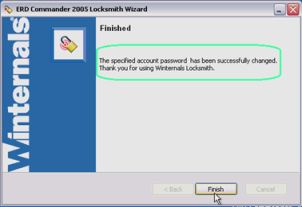
ចំណុចបញ្ចប់សូមចុចប៊ូតុង Finish
| ឈ្មោះកម្មវិធី | ទំហំ | ទីតាំង |
| ERD Cammander 2005 | ៦៦.០៥ មេកាបាយ | ទាញយក |
| ស៊ីឌីប្តូរពាក្យសម្ងាត់ (Password=kt42) | ១៥៥.៣៨ មេកាបាយ | ទាញយក |
| - របៀបបចម្លង File ISO ចូលក្នុងឌីស - របៀបតំឡើងកម្មវិធី ERD Cammander 2005 - បង្កើតកម្មវិធីសម្រាប់ប្តូរពាក្យសម្ងាត់ (E-book) ប្រភព kt42.info |